Ribbonby Burystack · our first app

Read the whole Bible, one well-paced day at a time.

Ribbon is a Bible app for J.N. Darby’s translation, with the reading plan built into the page you read. Pick a finish date, and Ribbon balances every reading day by words, not chapters.

  • Google PlayComing soon
Get an email when it launches

J.N. Darby’s New Translation (1890), Old and New Testaments. No account and no adverts.

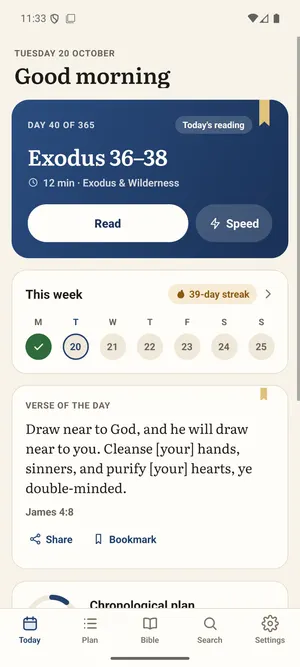
Ribbon’s Today screen: Day 40 of 365, Exodus 36–38, about 12 minutes, with Read and Speed buttons, this week’s readings and the verse of the day.

Why Ribbon

The reading plan is the reading. Everything else gets out of the way.

Built-in plan

The plan is on the page

Open the app and your next day’s reading is waiting, with about how long it will take. Any chapter you open shows where it sits in your plan, and one tap marks the day done.

Your finish date

Days balanced by words

Choose when you want to finish and which days you read. Ribbon gives each reading day about the same number of words, always ending on a whole chapter.

Two orders

Chronological or front to back

Read the Bible in the order events happened, with short notes on why passages sit where they do, or straight through from Genesis to Revelation.

Read ahead

Read ahead, finish sooner

Mark a chapter read whenever you read it. If it’s ahead of your plan, choose whether to finish sooner or keep your date. Fall behind, and Ribbon can spread the rest, or you can push your finish date back.

Search and look up

Find any verse

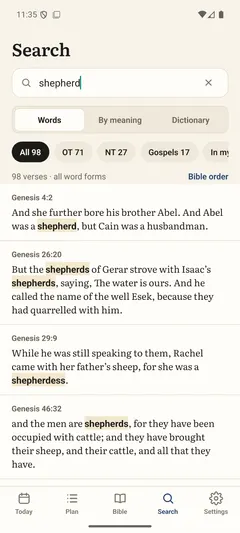
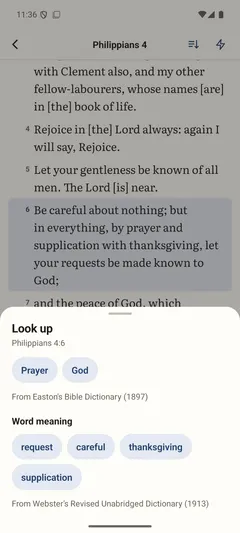
Search for words, a phrase or a reference such as John 3:16, all on your phone. Select a verse and tap Look up for Easton’s Bible Dictionary and what Darby’s words mean, old senses included.

Read your way

Verse per line

Each verse on its own line, numbered, like a printed Bible, or as paragraphs. Choose Literata or Sans at the size you like, in light or dark, and let the page scroll for you or listen to the day’s reading.

Speed reading

One phrase at a time

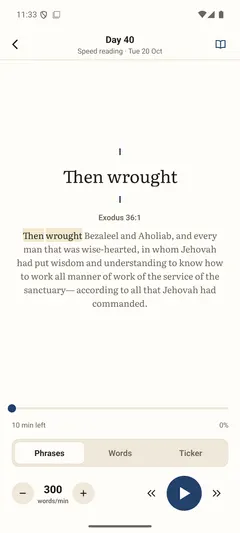
An optional speed reader shows the text phrase by phrase, word by word or as a moving line, at the pace you set. Start it from the top of the day’s reading or from any verse.

Save and share

Bookmarks, highlights and notes

Tap a verse to bookmark it, highlight it in one of four colours, add a note or share it as a picture. Everything you save is listed in one place, and stays on your phone.

Verse of the day

A verse for each day

A short verse sits below your reading each day, the same for everyone on that date. Tap it to read it in its chapter, or add it to your home screen as a widget, along with today’s reading or your plan’s progress.

How it works

Set it up once. Then just read.

  1. 01

    Choose an order

    Chronological or front to back, from the beginning or from the chapter you’re up to.
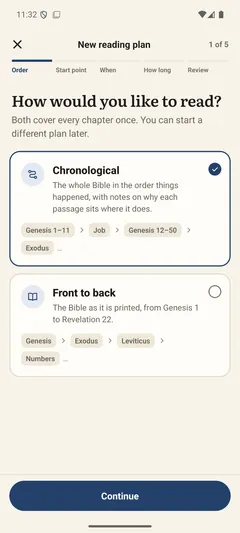
    Ribbon’s new plan screen asking how you’d like to read: Chronological, the whole Bible in the order things happened, or Front to back, as it is printed.
  2. 02

    Set your days and finish date

    Read every day, six days a week or on weekdays, pick when you want to finish, and Ribbon works out each day’s reading.
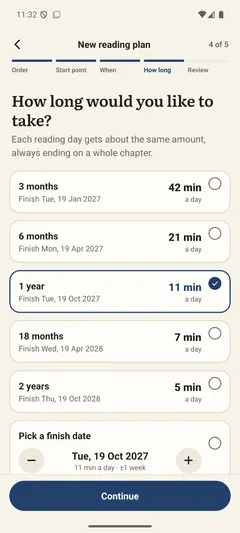
    Ribbon asking how long you’d like to take, from 3 months to 2 years or a finish date you pick, with the minutes a day for each.
  3. 03

    Read, then tap Done

    Your next reading is waiting when you open the app, and when you tap Done the next day is ready.
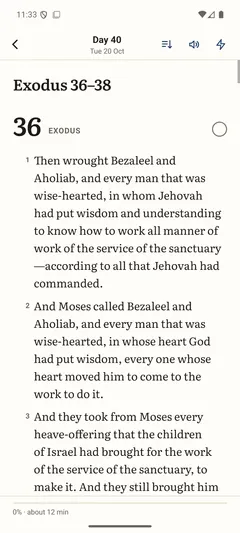
    A day’s reading in Ribbon: Day 40, Exodus 36, one numbered verse per line.

Be first to read with Ribbon

One email when it launches. Nothing else.

This form needs JavaScript to send. Email ribbon@burystack.com and we'll let you know when Ribbon launches.